


Nobody Loves a Timesheet: Modernising a Legacy .NET System in a Month with Claude Code
Software doesn't stay new
Every system is built to the standards of its day. The team that wrote it chose sensible frameworks, followed the guidance of the time and shipped something that worked. Ten years later, that same system feels fragile and expensive to change, even though nobody did anything wrong.
This is the normal life cycle of software, and it happens for reasons that have little to do with the quality of the original work:
- Libraries age. Frameworks reach end of support, vendors move on and security patches stop coming. A component that was a smart choice in 2016 can become a liability by 2026.
- The supply chain becomes a risk. Modern applications depend on dozens or hundreds of third-party packages. Attacks on those dependencies, through compromised packages, hijacked maintainer accounts or malicious updates, have become a real threat. The older and less maintained the dependency tree, the harder it is to see what you’re exposed to.
- Best practices move. Things that were standard a decade ago, such as server-rendered forms, manual deployments and logging to files on a server, have been replaced by better approaches. The old code is the same as it always was, but it’s now judged against a higher standard.
- User expectations change. Most people now expect to do quick admin tasks on a phone. Systems designed for a desktop browser in 2012 were never built for that.
- Knowledge drifts. The people who knew why a rule exists move on. Business logic gets buried in code and the original intent gets harder to recover.
The result is what engineers call code rot. The system still works, but each change costs a bit more and each deployment feels a bit riskier, until the business stops asking for improvements.
The system: A product of its time
Our client, a financial services organisation, ran a timesheet system that had grown up through the 2010s. It was an ASP.NET Web Forms application on .NET Framework 4.8, built in the style that was standard then: heavy third-party server-side controls, a lot of server-side logic, stored procedures by default, a little client-side code and postbacks for almost every interaction.
It was a sound design for its era, and it did its job. At month end it carried upwards of 500 concurrent users as consultants rushed to submit their hours, and it held up. Ask users about it and the most common answer was an unenthusiastic “it works“.
It never delighted anyone, though in fairness delight is relative when the product is a timesheet. Nobody has ever logged their hours and wished they could do it again. Still, there’s a big difference between a system that makes a chore bearable and one that makes it harder.
The pain built up slowly rather than all at once:
- The postback model made the interface stutter as the page round-tripped to the server in the background.
- The third-party controls couldn’t really be extended. When the vendor’s component didn’t do what the business needed, the team was stuck with it.
- It didn’t work well on mobile, which mattered more every year.
- It was harder to maintain and harder to deploy with each passing release.
- Logging went to files on the server, so problems were only found when someone went looking for them.
Our client wasn’t pushed into this by an outage or a security incident. That’s quite typical, and it’s why legacy systems stay around for so long. With nothing on fire, modernisation keeps losing out to more urgent work and rarely makes it onto the agenda at board meetings.
The hidden cost: Users stop asking
The biggest cost of the old system never showed up as an alert on a dashboard. Over time, users just stopped asking for features.
They weren’t short of ideas. They had simply learned that every request went onto a backlog and stayed there for a while. When change is slow and expensive, people stop requesting it, and the business starts to adapt its processes around the limits of the software.
That’s why we see modernisation as more than a technical exercise. A modern system, built so that the team can turn requests around quickly, brings the conversation between the business and its software back to life, and from there you can start improving the process around the system as well.
Starting with the rules, not the code
The riskiest part of any rewrite is losing behaviour that wasn’t documented. Ten years of business rules were embedded in the old application, some deliberate, some accidental and some no longer wanted. Our first job was to get them into the open.
We extracted them in two ways:
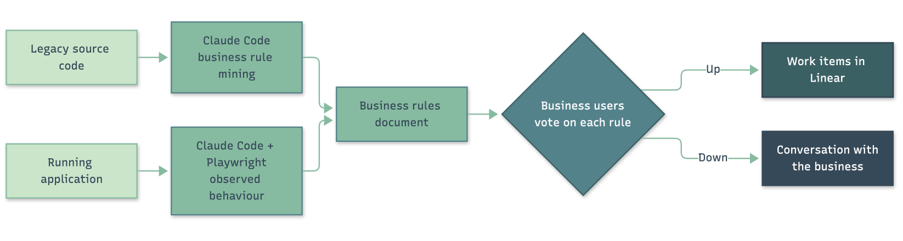
- From the source code. Using Claude Code, we analysed the existing codebase and pulled out the business rules embedded in it: validation logic, approval flows, calculation rules and edge cases. This is usually called business rule mining, and AI makes it much quicker than reading the code by hand. Claude Code worked through all the Web Forms pages and stored procedures and produced the candidate rules.
- From the running application. Code only tells part of the story, because configuration, data and runtime behaviour matter too. We used Claude Code together with Playwright to drive the live application and record how it actually behaved, producing a set of presumed business rules based on observation. This mirrors characterisation testing, the long-standing technique of capturing what a legacy system really does before you change it.
We combined both sources into a single business rules document and sent it to the business for verification. We didn’t want them to review a long document line by line, so we built a simple workflow: business users went through each rule and voted it up or down. Confirmed rules flowed straight into Linear, our task tracking system, as work items. Rejected rules became conversations. In the end the business confirmed the majority of the candidate rules.
Of everything in the project, this step mattered most. A rewrite that copies every old behaviour also copies the bugs and the rules nobody wants any more. That’s closer to the lift and shift approach many organisations took when moving to the cloud, and it isn’t what we mean by modernisation.
Designing with the business in the room
The moment that surprised the client most came during interface design.
Traditionally, UI work happens in cycles. The business describes what it wants, the team goes away for a week, and the business reviews the result and gives feedback. Then the cycle repeats. Each round costs a week, and the whole process can take months.
We used Claude Design to iterate on the interface live in front of business stakeholders. Someone would suggest a change, and they’d see it straight away. Questions like “what if approvals sat here?” or “can we see the whole week at once?” were answered in the meeting rather than in the next sprint review.
Stakeholders ended up shaping the design themselves, and feedback that used to take a week now took minutes.
The guiding principle came from Alan Cooper’s About Face, a book on interaction design we still reach for more than twenty years after it was first published: good software gets out of the user’s way. A timesheet should let people record their time and get back to their real work.
The new platform
The modernised system runs on:
- .NET 10 for the API, using Wolverine for messaging and command handling, which plays a similar role to MediatR but adds durable messaging.
- React 19.2 with Tailwind CSS for a responsive, mobile-friendly front end.
- Azure hosting, as before.
- Azure Application Insights for logging and telemetry, with alerts set to flag performance degradation.
Guardrails for the AI
At the client’s suggestion, one constraint was non-negotiable: the database schema stayed exactly as it was. This lowered cutover risk and protected other systems that depended on the data.
We enforced that constraint in the tooling as well as the project brief. The rule was written into the project’s CLAUDE.md files, which Claude Code reads as standing instructions. We also used a Claude Code PreToolUse hook, which runs before every command and file edit the agent makes, to block anything that would change the schema, such as EF Core migrations or ALTER TABLE statements.
Claude Code was also connected to Linear through the Linear MCP server. That meant the verified business rules and user stories were available to the agent while it worked, so implementation stayed tied to what the business had agreed.
One engineer, one week, then one month
A single forward deployed engineer, working with Claude Code, had a working core of the new system running within a week. The legacy system had been maintained by a conventional Scrum team.
The working core wasn’t the finished product. Over the next three weeks we completed the remaining business rules and, more importantly, took on improvements the business asked for once they saw what was possible. After one month the system had gone past a like-for-like copy, with new business rules, a properly mobile-friendly interface and more features already planned.
Testing, quality and the pipeline
Moving this quickly only works if you can trust what ships, so testing and automation got a lot of attention.
- Functional testing. We used Playwright extensively for automated end-to-end tests that exercised the system the way users do.
- Load testing. We load tested the system extensively with Locust to make sure it could comfortably handle the month-end peak of 500+ concurrent users.
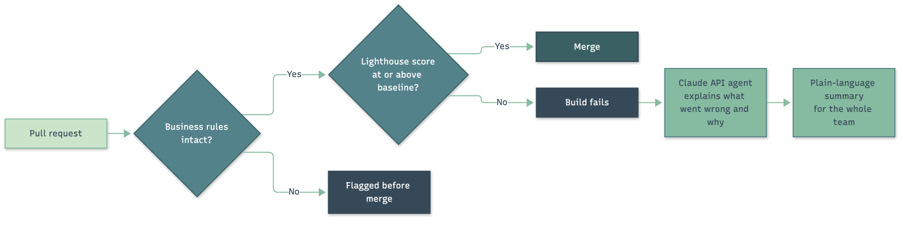
- Performance as a gate. The Chrome Lighthouse score went from 80 on the old system to 97 on the new one. That score is now a gate in our CI/CD pipeline, so any change that drops below the baseline fails the build.
The pipeline runs on Azure DevOps, with Claude Code running in headless mode (claude -p) as a pipeline step. It returns JSON, so the pipeline can read a pass or fail result directly. Two uses stand out:
- Pull requests are validated against the business rules. Each PR is checked against the verified business rules. A change that looks fine on its own but breaks an agreed rule gets flagged before it merges. The business rules document is the same for every check, so prompt caching saves Claude from processing it again each time, which cut the cost of each check significantly.
- Failed builds are explained in plain language. Instead of a cryptic failure email, build failures go to an agent built on the Claude API, which interprets the failure and explains what went wrong and why. Non-technical team members get the most out of this, since they can now follow what’s happening in delivery without needing a developer to translate.
Cutover without hiccups
Keeping the database schema unchanged paid off at cutover. There was no data migration to plan, rehearse or recover from.
We ran an A/B period with selected users, who captured their time in both systems. Background SQL scripts compared the results to confirm data integrity. Because both systems shared the same schema, the comparison scripts were simple to write.
Timesheet systems have a natural rhythm. Month end is frantic, and the middle of the month is quiet. We used a lull of a few days mid-month and switched over in a single night.
What changed for users
Users told us the interface got out of their way and let them get the job done quickly. The system loaded faster, and it loaded in a ready state, so people could start capturing time immediately instead of waiting for the page to settle.
We’ve seen fewer errors in the logs since go-live. In fairness, it’s hard to say whether the old system had more errors or simply had nobody reading its log files. The new system’s monitoring and alerting are a big step up, so problems now find us rather than the other way round.
AI inside the application
Modernisation also opened the door to features that were never realistic on the old platform.
Helping without hovering. Machine learning models track time capture patterns over time. They help users notice when they’re consistently overworking and when they’re approaching a client budget. We designed this carefully so it supports people rather than watching them, giving users useful information early instead of quietly keeping score in the background.
Speak your timesheet. Voice input came from a user wish list, the kind of request that would have died on the old backlog. Users now press a single button and describe what they worked on. Claude Haiku, which we chose for its low latency, interprets what they said against the projects that user is actually assigned to and works out the most likely entry.
Cleaner entries. Claude also helps tidy up timesheet descriptions, turning shorthand like “meetings” or “fixes” into clear descriptions that hold up when a client reviews an invoice.
AI around the application
We also used the Claude API to improve the delivery process itself. Custom agents monitor the Linear backlog and help users write stories that meet the team’s definition of ready. They check each story against the sprint it sits in and against company, team and delivery objectives, and they help the Scrum Master prioritise. The stories reaching sprint planning are better written, and that shows in the work that comes out of each sprint.
The forward deployed approach
This work was delivered by CyberPro’s Forward Deployed Engineering team. Forward deployed engineers work inside client organisations, close to the people who use the software and the people who maintain it. They run proofs of concept and bring in new technology, but mostly they make sure things ship.
There are two ways we work. We can modernise a system for a client, as we did here. Or we can work alongside the client’s own team and guide them through doing it themselves. We prefer the second approach, because a team that knows how to modernise its own systems with these tools will keep doing it long after we leave.
Don't carry it into 2027
Many organisations still treat their legacy systems as a permanent fact of life. We regularly meet teams dragging old Delphi applications and ageing .NET Framework systems behind them, slowing down their departments and sometimes the whole company.
That way of thinking is itself a kind of legacy. The assumption that modernisation must be a multi-year, high-risk programme belongs to a time before tools like Claude Code, Claude Design and AI-assisted testing and delivery. Today, a focused team with the right tooling and clear guardrails can do in weeks what used to take quarters.
If your teams are struggling to deliver while new technology promises speed, the problem is often the weight of the systems they’re carrying rather than the people themselves. You don’t need to solve all of it at once. Pick one system and chip away at it.
So don’t let technical debt follow you into 2027. The tools to deal with it are available today, and every month you wait is another month the business spends working around its own software.
