
Using Power Automate, SharePoint and AI to increase productivity
We send a lot of emails internally. A lot. Most of the time that process works, but sometimes things get lost in the noise which means the potential for a missed opportunity, lost sales or forgetting something important.
The CyberPro team is always on the lookout for opportunities to automate a way of working where it makes sense and we found something in our recruitment team. There was nothing wrong but there was a way we could modernise something and do it quickly without breaking an existing flow or needing them to retool and relearn.
Smoothing out an internal recruitment workflow
Every Monday, our recruitment manager sends out a weekly email to their team showing assigned vacancies, clients, and submission targets for the week. The email worked well enough as a broadcast, but often that was it: a broadcast. It got attention in the moment but slowly dropped below the fold in Outlook and wasn’t seen again until the next weekly checkpoint.
Here is an example of what that weekly “broadcast” email looked like:
From: Management
To: Recruitment Team
Subject: Weekly Recruitment Focus — w/c 01 June 2026
Hi team,
Please focus on the following vacancies this week. Target is minimum 5 CV submissions per recruiter.
Recruiter A:
- Cloud Solutions Architect – Client B
- Senior DevOps Engineer – Client C
- Azure Architect – Client D
Recruiter B:
- Java Developer – Client E
- Senior Scrum Master – Client E
- .Net Developer – Client F
Thanks
Like anything email-driven, there was no shared view of what was happening, no way to track progress mid-week, and no structured data to report on. Specifically:
- No central task view: Each recruiter managed their own to-do list. There was no shared board showing what was in progress, stuck, or done, which meant no metrics to feed into the next improvement cycle.
- Manual and inconsistent tracking: Recruiters used their own personal tools for tracking. Progress updates only surfaced at the weekly review meeting.
- Limited accountability: Without a structured system, it was hard to know who owned what, or how far along a vacancy was at any point during the week.
- Reporting took effort: Pulling together a weekly performance view required chasing updates manually. Microsoft Planner exists precisely for this kind of work, but the team wasn’t using it yet.
Our Solution
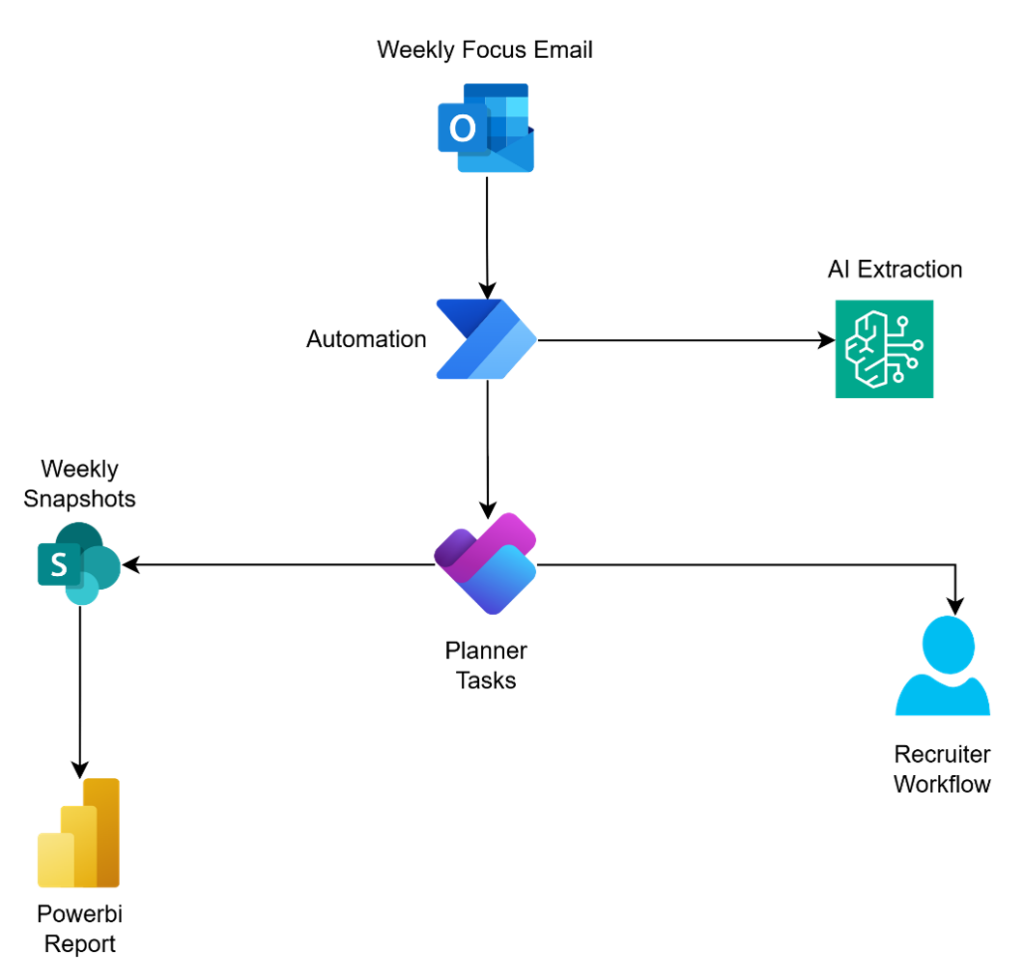
We used Microsoft 365 tools the team already had access to and knew: Power Automate, Planner, SharePoint, and Power BI with a layer of AI to remove the manual steps in between.
The steps we used
- Power Automate monitors the weekly email
- When the weekly focus email arrives, a Power Automate flow triggers AI reads the email and extracts the key information
- A large language model (OpenAI) processes the email body using a structured prompt. It identifies each recruiter by name, their assigned vacancies, the client for each role, and the submission target for the week.
- Planner tasks are created automatically
- The AI output is used to automatically create a task in Microsoft Planner for each vacancy assigned to the right recruiter, ready to work from
- Recruiters work from Planner instead of needing to find the weekly email throughout the week
- Recruiters tick off checklist items as they progress each vacancy. The board gives everyone recruiters and managers a shared view of what’s in progress, what’s stuck, and what’s done. No more hunting through emails or chasing updates in meetings.
- SharePoint stores everything in one place
- At the end of each week, a Power Automate flow reads the current state of the Planner board and writes a snapshot to SharePoint
- Power BI gives management a view across all weeks
- A Power BI dashboard connects to the SharePoint snapshot data, which accumulates a record of every week. Management can track recruiter productivity, submission counts, vacancy pipeline status, and delivery against targets
Results
Automating something without measuring the impact is a vanity project and doesn’t make sense to us, so from day one we keep stats of what was happening and how it improved the business.
The change was straightforward to implement and started reducing the admin burden on both recruiters and managers from the first roll out.
Key improvements we noticed from our metrics as well as the users:
- Tasks created automatically: What used to take 30–60 minutes of manual setup each Monday now happens in seconds, triggered by the email itself.
- Shared visibility: Everyone on the team can see the current state of every vacancy without asking. The Planner board is the source of truth.
- Accountability built in: Every vacancy has a named owner and a standard checklist. Progress is visible to the whole team throughout the week.
- Meetings became more focused: The Planner board is pulled up during the weekly review and walked through vacancy by vacancy. Because everyone’s progress is already visible, the meeting shifts from collecting status updates to discussing what’s blocked and what needs attention.
- Reporting without the overhead: Management dashboards update in near real-time. No manual data collection or no spreadsheets and the best benefit – no more emails asking for updates!.
Time saved after implementation: Manager + 4 recruiters
| Activity | Time savings (Per Recruiter) |
|---|---|
|
Weekly task creation |
15 minutes per week |
|
Meeting notes & actions |
15 minutes per week |
|
Vacancy progress reporting |
30 minutes per week |
|
Recruiter performance reporting |
10 minutes per week |
|
Weekly management reviews |
20 minutes per week |
|
Total |
1 hour 30 minutes per week |
Technologies Used





It’s 2026 which means there is no end to the list of tools we can use but we’re all about going with the pragmatic choice so we stuck to the Microsoft stack for this round of automations
- Microsoft Power Automate
- Microsoft Planner
- Microsoft Teams
- Microsoft SharePoint
- Microsoft PowerBI
- Open AI
What’s next?
Power Automate handles the email trigger and task creation. OpenAI processes the email and meeting transcripts using structured prompts to extract recruiter names, vacancy details, and action items. Zoho Recruit is the team’s ATS when a recruiter schedules an interview there, a Power Automate integration automatically ticks the corresponding checklist item on the Planner task, keeping the board in sync without any manual update.
We’re keen to get rid of another email and that weekly task list broadcast is a likely candidate.
The team is busy wiring up Recall.ai to attend the Monday meeting so it can figure out tasks, prioritise and who should be assigned in real time. Management will be the human-in-the-loop to confirm everything after the meeting has wrapped.
A Teams Bot will perform routine check ins with recruiters to see how they are tracking with tasks and offer some guidance where needed.
