

How we built a lead profiling agent on Microsoft Azure, and what it taught us
One of our clients has just launched a new product and they wanted to know one thing: which of their existing leads look most like the customers who would buy it? The answer was somewhere in their CRM where 10,000+ detailed lead profiles were stored as PDFs.
They typed a two-line description of the ideal prospect into a Microsoft Teams agent we’d built and a minute later they had a ranked shortlist of leads, each with a note on where it matched the profile and where it fell short. Several were companies the team had forgotten they’d ever spoken to.
That moment is why we built the agent for them. This is the story of how we did it, what we got wrong along the way, and what we think makes the difference between an AI system people trust and one that ends up not getting used with users reverting to the “old way”.
The problem with finding the right leads
Qualifying leads sounds simple until you watch someone do it. A salesperson has a target profile in their head and a CRM search box in front of them. They type “Azure migration” and get back every lead whose notes use that phrase, but miss the ones that mention “moving off our data centre” or bury it in a meeting summary. Then they open each profile, read through company research, call notes and org charts, and judge the fit by eye. The best salespeople rely on memory, which means the knowledge leaves when they do.
The client’s brief was easy to state. A salesperson should be able to describe the prospect they’re looking for, or paste in the details of a customer they’d like more of, and get back the best-matching leads in the database, each with a clear account of why. It had to live in Teams, where the sales team already works, and it had to stay current as new leads arrived without anyone needing to run an export process.
What the salesperson sees
A salesperson types something like “mid-sized UK logistics firm, 200 to 1,000 staff, planning to move its ERP to the cloud in the next year.” The agent replies straight away to say it’s on the case. A minute or two later it posts the results: the top ten leads as cards, each showing an overall fit score with three sub-scores, the points where the lead matches, the gaps and a suggested next step. The full ranked list of 20 is a click away as an Excel.
Behind that simple exchange sit two halves sharing one Azure AI Search index. A nightly ingestion job that writes to it, and the Teams agent reads from it on demand. We deploy the two separately, so a change to how leads are scored doesn’t touch the sync.
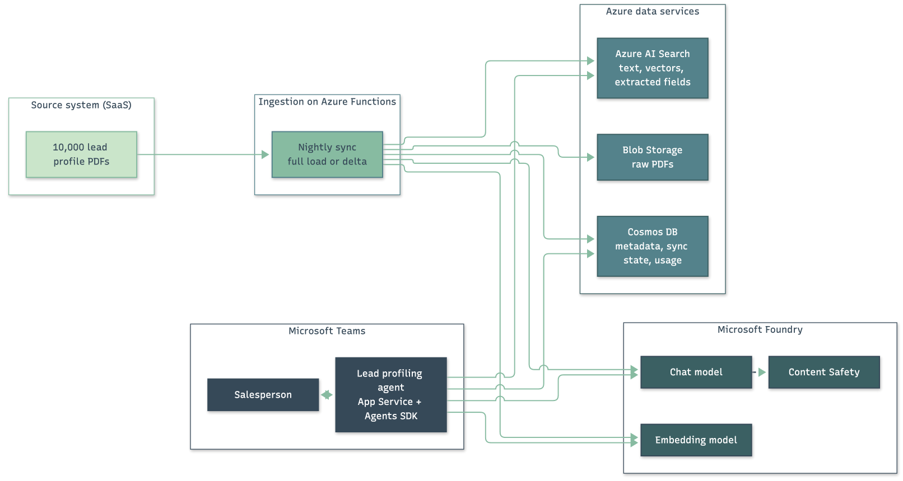
The agent’s infrastructure is defined in Bicep and deployed through the Microsoft 365 Agents Toolkit, which also handles the Teams app registration and publishing through the Teams Admin Center. The toolkit shortened development noticeably by handling app registration and publishing for us. We’re fans of anything that can cut delivery time without jeopardising our quality bar.
Keeping it as simple as the job allows
We’ve learned to be wary of complexity, particularly in AI projects. Every extra component adds cost and another thing that can fail, so we set ourselves a rule: each piece had to earn its place against a simpler alternative, or ideally, not needing to be there at all.
Here are a few of the choices we made and why.
| Decision | What we chose | Why |
|---|---|---|
|
Orchestration |
Azure Functions (Python), timer and HTTP triggers |
Nightly batch work plus a stateless API. A container platform would have added operational overhead with no benefit at this scale. |
|
Metadata and sync state |
Azure Cosmos DB |
Upserts keyed on the source record ID, plus a single checkpoint document. |
|
Raw files |
Azure Blob Storage |
Cheap, and the file name is the source ID, so a re-upload overwrites rather than duplicates. Files are stored here for historic/audit purposes and the storage tier downscales over time to save costs further. |
|
Retrieval |
Azure AI Search |
Keyword, vector and hybrid ranking without running a separate vector database. |
|
Models |
Azure OpenAI in Microsoft Foundry |
Embeddings and chat in the client’s own tenancy, with the content filtering, private networking and data protection terms their policies required. |
|
Front end |
Teams agent on the Microsoft 365 Agents SDK |
The sales team already works in Teams, and sign-in uses their existing Entra ID accounts. |
|
Agent pattern |
Fixed, ordered pipeline |
Predictable cost and behaviour for a task with one correct sequence of steps. |
The agent pattern is the choice people ask about most. Autonomous agents are valuable when you can’t know the sequence of steps in advance. Here we could, so letting a model decide when to search, when to re-query and when to stop would have added latency, token spend and variability in exchange for flexibility the task didn’t need at this stage.
Getting meaningful text out of a PDF
If we could give ourselves one piece of advice at the start, it would be to spend more time here. Everything downstream (the embeddings, the search, the scores, the evals) is only as good as the text pulled out of the PDF.
A PDF doesn’t contain paragraphs. It contains instructions for drawing characters at positions on a page, and the extraction tool has to work out the reading order, words and structure for itself. Lead profiles can push that reconstruction quite hard and it was something that tripped us up on earlier projects.
Here are edge cases worth considering and perhaps some here could save you time:
- Slide deck exports. Text boxes come out in the order they were created, not the order they’re read.
- Multi-column layouts. Brochure-style company research gets read straight across the columns, splicing unrelated sentences together.
- Company financials and headcount collapse into runs of numbers with no indication of which figure belongs to which year.
- Repeated headers, footers and watermarks. A “Confidential, page 3 of 12” footer or a “DRAFT” watermark appears on every page, sometimes in the middle of a sentence, and pollutes the embedding.
- Ligatures and hyphenation. Some fonts store “fi” as a single character, so “financial” can come out as “nancial”, and words split across lines arrive as “infra-” and “structure”. Neither half matches a search.
- Text that isn’t text. Org charts, logos and pasted screenshots of web pages are images, so the names and job titles inside them are invisible without OCR. Values typed into fillable form fields and reviewers’ comments may be skipped or appear in odd places.
- Hidden text. White-on-white text and content outside the visible page are still extracted. Usually it’s harmless leftover content, but it’s also a route for prompt injection, which we come back to in the guardrails section of this article.
- Email exports. Call notes saved from email carry the whole reply chain, so the same paragraphs appear several times and carry more weight than they should. Sometimes top to bottom, others the reverse which breaks context terribly.
- Event sign-up forms and printed research packs often have no text layer at all.
We tried four approaches on a sample of the data:
- pypdf, our baseline. Pure Python, fast and free, and decent on cleanly generated single-column documents, but it reads only the text layer, so scans come back empty and tables lose their structure.
- PyMuPDF and pdfplumber, for more control. PyMuPDF returns positioned text blocks, so headers and footers can be stripped by where they sit on the page, and pdfplumber handles ruled tables better. PyMuPDF is AGPL-licensed unless you buy a commercial licence, which is worth checking before shipping code that depends on it.
- Azure Document Intelligence (now part of Foundry Tools), the most capable. prebuilt-read handles OCR for scans, and prebuilt-layout returns Markdown with headings and tables intact and labels headers and footers for easy removal. The trade-off is per-page pricing, which adds up across 10,000 profiles.
- A vision-capable language model (we tested GPT-4o), reading page images. Well-structured output even on messy scans, but the slowest and most expensive option, and the one we trust least for factual records. A model reading a page tends to tidy what it reads, and a silently “corrected” revenue figure or job title is worse than a missing one.
We’re often asked why we didn’t use Azure Content Understanding, Microsoft’s newer service in Foundry Tools that builds on Document Intelligence and has been generally available since November 2025. Its strength is generative field extraction: you define a schema and it uses a language model to fill it in, across documents, images, audio and video. That suits projects where extraction is the whole job. Here we only needed the service to read the page faithfully. Field extraction already happens in our own pipeline, against a single schema shared with the search index and the evals. Document Intelligence’s layout and OCR models are deterministic, so the same page always produces the same text, with no model in a position to tidy it. They’re also priced per page, without generative token costs on top. For workloads that span media types, or where the schema is the product, we’d look at Content Understanding first.
For the first release we kept pypdf. Most of the profiles were digitally generated, so the text layer was good enough for search and cost nothing to process. Scans are detected and logged for follow-up. The next step is to route each document to the cheapest tool that can handle it.
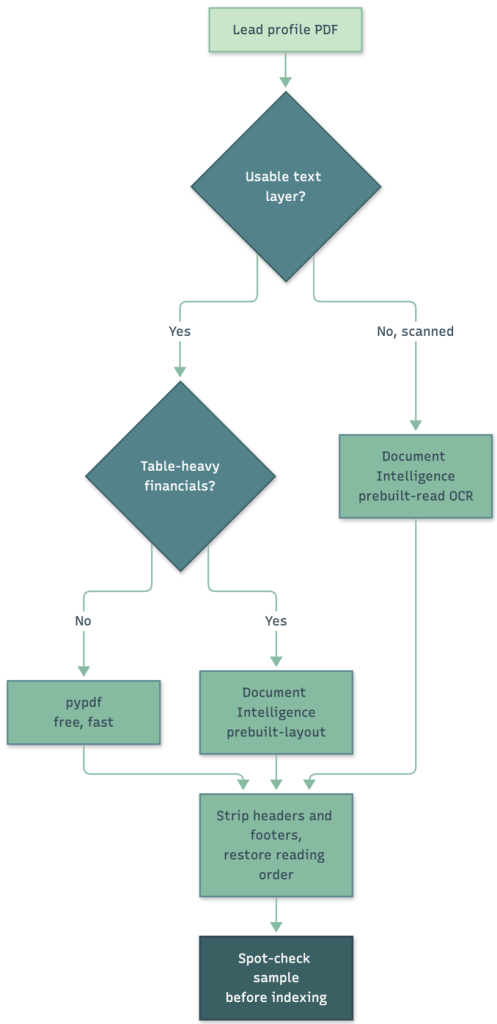
The bigger lesson is to measure extraction quality on a sample before indexing anything. If the text is wrong at the start, every evaluation you run later is measuring the wrong thing.
Indexing is expensive, so watch it closely
Indexing takes far longer than most people expect. Every profile is downloaded, its text extracted, read by the chat model for field extraction, embedded, and written to Blob Storage, Cosmos DB and the search index. That’s several seconds per document, and across 10,000 profiles a full load could run for hours.
The cost of getting it wrong is time. If we found a problem after the load has finished, such as poor text extraction, a badly worded extraction prompt or a forgotten field, the fix usually means indexing everything again. So we treat the first load as something to watch, not something to start and walk away from.
It’s a lesson we’ve borrowed from the traditional machine learning work we’ve done. Nobody trains a model on the full dataset first. You prototype on a small sample and check the results against a held-out validation set. Only once the pipeline is proven do you commit hours of compute to the full run. Indexing deserves the same discipline. We index a pilot batch of around 100 profiles, read the extracted text and fields by hand, and run a handful of test searches whose right answers we already know. Only when that looks right do we expand to 1,000, and then to the full archive. Each stage also tells us the time and tokens per document, so the cost (and time) of the full run is a forecast rather than a surprise.
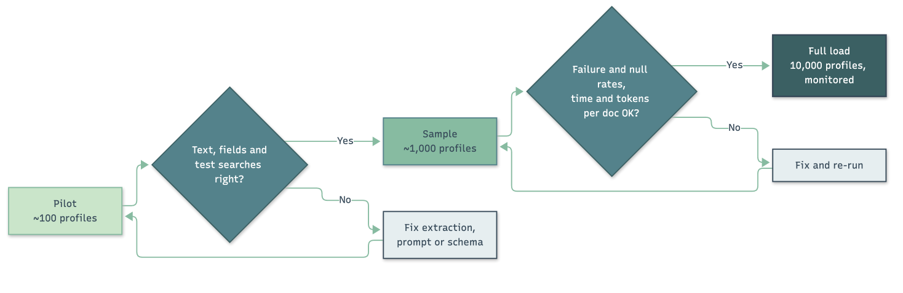
While ingestion runs, every document’s outcome is logged to Application Insights: indexed, skipped because it had no text layer, rejected by the content filter, or failed. We track throughput, token usage and how often extracted fields come back empty, because a sudden rise in nulls is usually the first sign that extraction or the prompt has gone wrong. Catching a problem in the pilot costs minutes. Catching it at the end costs the whole run.
The load is also built to stop and restart cleanly. Records are fetched in pages of 100, with a checkpoint written to Cosmos DB after each page, and because every downstream write is an upsert, reprocessing a half-finished page does no harm. If monitoring shows something wrong, we can stop, fix it and carry on from where we left off, instead of starting again from scratch.
Once the backlog clears, the system switches itself into delta mode. Every night it asks the source for anything modified since the last successful run. The timestamp it saves is the moment the run started, so anything edited during the sync is picked up the following night, and a failed run saves nothing, so the next one retries the same window.
As each profile comes in, the chat model reads it once in JSON mode at temperature 0 and extracts a handful of structured fields: industry, company size, region, technologies in use and stated needs. The fields are defined once in a single schema, which generates the extraction prompt, the Cosmos DB document and the search index fields, so adding a new field is a one-line change. Values are type-checked on the way in, and anything that can’t be confirmed is stored as null.
Hybrid search for precise language
All model calls go to Azure OpenAI deployments in a Microsoft Foundry project. When we built the system that meant text-embedding-ada-002 for 1,536-dimension vectors and GPT-4o for extraction, query expansion and lead analysis. Lead profiles contain personal information about real people, so keeping inference inside the client’s own Azure tenancy, under Microsoft’s data protection terms, was agreed before we started sketching out the architect.
Models move quickly. GPT-4o has since been deprecated, with its versions retiring between December 2026 and April 2027, and ada-002 has been superseded by the text-embedding-3 family. Deployment names live in configuration, so switching is a settings change. The golden data set, described below, is what tells us a replacement is at least as good. Changing the embedding model also means re-indexing every profile, which is one more reason to get indexing discipline right from the start.
Lead profiles are full of precise language, including company names, job titles, product names and technology stacks, and vector search on its own tends to blur those details. So we built hybrid search into Azure AI Search from the first day. Each lead is one document in the index, with full text analysed by the en.lucene English analyser, a vector field on a cosine HNSW graph, and the extracted fields available as filters. The analyser choice mattered more than we expected: it fixed an early bug where short terms matched inside longer ones, so a search for “Java” kept returning companies that only used “JavaScript”.
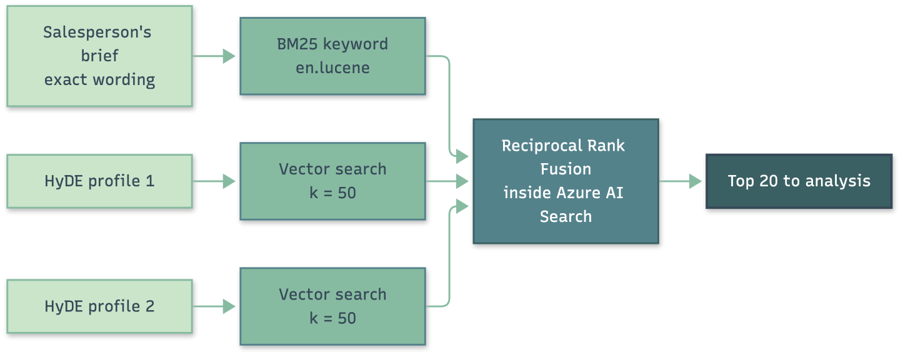
Every query sends the salesperson’s own words to BM25 keyword ranking and two vectors to nearest-neighbour search (k = 50 each). Azure AI Search merges the three ranked lists with Reciprocal Rank Fusion (RRF), which adds up 1/(k + rank) for each list a lead appears in. A lead that does reasonably well on all three signals beats one that tops a single list and is missing from the others, which suits a shortlist. The top 20 go forward to analysis.
Retrieval first, then reranking
Search systems usually work in two stages. The first, retrieval, has to run across the whole index in milliseconds, so it relies on quick signals: matching terms for BM25, and distances between precomputed vectors for vector search. It’s good at finding plausible candidates but blunt at putting them in order, because the query and each document are never read together. The second stage, reranking, takes only the top candidates and reads each one alongside the query to judge how well it fits. That’s much more accurate, and much too slow to run over 10,000 documents, so it only ever sees a shortlist.

Azure AI Search provides both stages. BM25, vector search and RRF are retrieval, and the semantic ranker is its built-in reranker. Over the past couple of years, we’ve built and rebuilt our own rerankers but for this use case, AI Search did a great job. It takes the top 50 results from RRF and builds a summary of each document, up to 2,048 tokens, from the fields named in the index’s semantic configuration. It then scores each summary against the query using language models adapted from Bing, giving a relevance score from 0 to 4. It also returns captions: verbatim passages that show why a result matched, with no generated text.
Our pipeline already has a reranking stage of its own. The chat model’s analysis of each of the 20 shortlisted leads is a reranker, though an expensive one. That’s the real case for adding a semantic ranker. Tracing showed the 20 analyses are where most of the time and tokens go, so a better-ordered shortlist means we could send fewer leads to the model without losing good ones. The captions could also appear on the result cards as evidence for each match. One caution: because the ranker only reads a summary, long profiles get trimmed, so the extracted fields and summaries should come first in the semantic configuration. It’s the next thing we plan to evaluate against the golden set, where the retrieval critic’s recall and reciprocal rank will show whether it earns its place.
Hyde: searching with an imagined lead
Vector search works by turning text into an embedding, a long list of numbers that captures what the text means. Texts with similar meanings get similar numbers, so finding relevant documents becomes a matter of finding the nearest ones.
The catch is that a salesperson’s brief and a lead profile are different kinds of text. The brief is a sentence or two describing what someone wants. A profile is several pages describing what a company is, written in the language of company research and call notes. Even when they’re about the same kind of business, their embeddings don’t sit close together, so a search with the brief alone tends to miss good matches.
Hypothetical Document Embeddings (HyDE) is a technique from a 2022 research paper by Gao, Ma, Lin and Callan that closes this gap. Instead of searching with the question, you ask a language model to write the answer you’re hoping to find, and search with that. In our case, we ask the chat model, prompted as an experienced business development researcher, to write the profile of the lead the salesperson is looking for. We then embed that imagined profile instead of the brief, so the search compares profile with profile.
Here’s what that looks like in practice. The salesperson types:
Mid-sized UK logistics firm, 200 to 1,000 staff, planning to move its ERP to the cloud in the next year.
The model turns that into something that reads like a real lead profile. An excerpt:
Company overview [Company A] is a UK third-party logistics provider headquartered in the Midlands, running 12 distribution centres with around 650 employees. Revenue has grown steadily, driven by contracts with national retailers.
Technology landscape Core operations run on an on-premises ERP hosted in the company’s own data centre. The hardware support contract ends next year, and the IT team is stretched maintaining ageing infrastructure.
Recent conversations Discovery call with the IT Director: the board has approved an ERP modernisation programme for the next financial year, and cloud hosting is the preferred option. Concerns centre on migration risk during peak season.
None of that is true of any real company, and it doesn’t need to be. It uses the vocabulary, structure and level of detail of a real profile, so its embedding lands among the real profiles that look like it, not among other short pieces of text.
Look at what the model added. The salesperson never mentioned a data centre, a hardware support contract, an IT Director or board approval. The model filled those in because that’s what a company in this position usually looks like. That’s the real benefit of HyDE: it brings in the knowledge an experienced salesperson carries in their head. It’s how the search finds the lead whose notes say “moving off our data centre” when the salesperson typed “move its ERP to the cloud”, which is the problem a keyword search couldn’t solve.
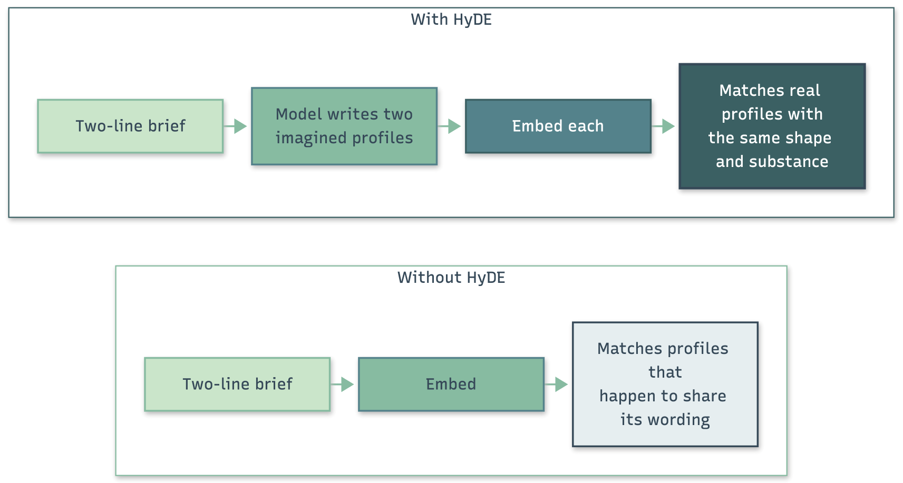
We generate two hypothetical profiles in parallel at temperature 0.3. A single draft can wander somewhere the salesperson never intended, and a second independent one evens that out, because RRF rewards real leads that sit close to either. HyDE sits behind a configuration flag, which gives a cheaper mode when speed matters and a clean way to measure what it adds. For data pipelines like this, we tend to litter feature flags all over.
The invented profiles are never shown to anyone or scored against. Their only job is to produce a better search vector, so nothing they invent can reach the answer.
HyDE isn’t free. It adds two model calls to every search, which costs tokens and around ten seconds before the search can even start. The model’s assumptions can also pull results in a direction the salesperson didn’t intend: if it decides the ideal lead is based in the Midlands, that detail nudges the vectors. Two independent drafts soften that, and the keyword leg of the hybrid search always uses the salesperson’s own words, so an exact match still counts. In our golden-set tests, the extra recall was worth the wait.
In-context learning and the drifting scores
Each of the 20 shortlisted leads goes to the chat model alongside the brief, and the model returns a JSON verdict: an overall fit score, three sub-scores, the points of match, the gaps and a suggested next step.
Our first version had a problem we only spotted when we lined results up side by side. Each analysis worked out the brief’s requirements for itself, so one lead was judged against a minimum of 200 staff and the next against 500. Every score looked plausible on its own, but together they made no sense. The fix was to extract the requirements once, in parallel with HyDE, and inject them into every analysis prompt as explicit context, including how much weight company size should carry.
That’s in-context learning at its simplest: the model is unchanged, and what goes into its context window steers its behaviour. Clients often ask about fine-tuning first, and in our experience it’s rarely what they need first. The same mechanism extends naturally to few-shot examples, where worked examples of brief, lead and expert verdict are retrieved by similarity and added to the prompt, so a salesperson’s correction can shape answers the same afternoon without retraining anything.
A fixed pipeline, watched step by step
Every request runs the same five stages in the same order, with parallel work inside each stage.

The order follows the data: analysis needs the extracted requirements, and embedding needs the HyDE drafts. Because the sequence is fixed in code, every request costs roughly the same and behaves the same way.
The whole pipeline takes longer than Teams will wait for a bot to reply, so the agent acknowledges the message immediately, carries on in the background with a typing indicator refreshed every 2.5 seconds, and posts the results as a proactive message using the saved conversation reference. Each step is also isolated: if one lead fails analysis, it’s dropped and logged while the other nineteen carry on.
Making sure it stays good
Getting a good answer once is the easy part. The real work is proving answers stay good as prompts, models and data change, and that’s where we put a large share of our effort.
Guardrails on the way in and out
Cheap deterministic checks run first (length limits, empty or non-text input). The brief then goes through Prompt Shields, part of Azure AI Content Safety and configured as a guardrail in Foundry, to catch direct prompt injection, and retrieved profiles go through the same service to catch indirect injection, where text inside a document is written to manipulate the model reading it. Lead profiles are built partly from outside sources such as company websites, emails and web forms, so guarding them matters as much as guarding the user’s prompt.
On the way out, every response must parse against the expected JSON schema, and scores are clamped to their valid range before they reach a card. Content filters apply to completions as well as prompts, and Content Safety groundedness detection checks free-text recommendations against the profile text the model was given.
Content filtering taught us a valuable lesson. Some perfectly legitimate profiles tripped the default filter, and in the first version one filtered document took down the whole request. The agent now catches the content_filter response, skips that document and logs it. The longer-term fix is a custom guardrail in Foundry, with content filter settings tuned to the domain.
Critics and the golden data set
Guardrails stop harmful or malformed output. Critics catch output that looks fine and is wrong, by comparing what the system did against a known-correct reference.
That reference is a golden data set: real briefs, each paired with the leads an experienced salesperson says belong on the shortlist and the verdict they’d give. Fifty well-chosen briefs that cover the awkward cases tell you more than five hundred easy ones, and a small set is one your experts will keep up to date.
We run three critics against it, one per place the pipeline can go wrong:
- Prompt critic: were the right industry, company size and priorities extracted from the brief?
- Retrieval critic: recall at 20 and mean reciprocal rank of the first correct hit.
- Answer critic: a separate LLM-as-judge call, ideally using a different model family, comparing each verdict with the expert’s.
Splitting critics by stage shows where a regression came from. If answer quality drops while retrieval holds steady, the problem is in the analysis prompt or the model, and the index can be left alone.
Evals and hallucination scores
The measuring is done with Foundry’s evaluation tooling, whose built-in evaluators cover groundedness, relevance, coherence and retrieval quality. They run locally in a CI pipeline through the Azure AI Evaluation SDK.
Groundedness matters most. It measures how much of each response is supported by the context the model was given, which in practice makes it the hallucination score. A verdict claiming a prospect is already planning a cloud migration when their profile says nothing of the kind is the kind of mistake that costs a salesperson’s trust for good, and can make for an awkward first call which would end up reducing trust from the user. The groundedness evaluator scores it offline across the golden set, and Content Safety groundedness detection checks it live on each response. Design reduces the risk before either runs: every analysis receives the full text of the profile it’s judging, the HyDE drafts never reach the user, and every call whose output is shown runs at temperature 0.
Our rule is simple: If a prompt or model change hasn’t been through the evals, it doesn’t ship. It’s a similar check we do on software projects.
Tracing with OpenTelemetry
One salesperson’s question triggers around 25 model calls, a search query and twenty database reads. We instrument with OpenTelemetry and export through the Azure Monitor distro into Application Insights, so traces appear both in the Foundry tracing view and in the operations team’s existing dashboards. A root span runs from the Teams message to the final card, with each stage and model call as a child span, and the OpenAI instrumentation records the model and token usage for every call using the OpenTelemetry GenAI semantic conventions. Those conventions are still marked as in development, so we pin library versions and expect attribute names to change.
Tracing showed us two things quickly. The 20-way analysis fan-out dominates the request, and because the slowest call sets the pace, tail latency matters far more than the average. Token consumption piles up in the same stage.
Model routing
That led to model routing. The first version sent every chat call to one GPT-4o deployment, which was right for proving the idea and expensive to keep running. Requirement extraction is a short classification job and HyDE needs fluent business writing without much reasoning, so both suit a small model such as GPT-5.4 mini. Only the analysis step needs a frontier model reading a long profile carefully. Routing by step only needs a deployment name per step in configuration, and Foundry’s model router is an option for more open-ended workloads. Either way, a cheaper model only takes over a step once it matches the golden-set baseline for that step.
A person makes the decision
This is the part of the project we care most about, and with lead data it matters even more.
For our South African clients, Section 71 of the Protection of Personal Information Act (POPIA) says a data subject may not be subject to a decision with legal consequences, or that affects them substantially, based solely on automated processing intended to build a profile of them. Scoring leads is profiling by definition. POPIA’s definition of a data subject also includes juristic persons, so the companies being scored have the same protection as the individuals named in their profiles. Where an exception applies, the affected party must be able to make representations and be given enough information about the underlying logic. (We’re engineers, not lawyers, so please take your own legal advice.)
A line of small print saying “AI output may be inaccurate” doesn’t on its own put a person in the loop, so we designed the system around the salesperson’s decision instead. The agent recommends and the salesperson decides. Every card shows its reasoning, covering where the lead matched, where it fell short and why the score is what it is, so the person making the call can see the logic and challenge it. Nothing is written back to the CRM, and no lead is contacted, disqualified or reassigned automatically.
Feedback completes this loop. Each result card has a thumbs-up and thumbs-down with an optional reason, stored in Cosmos DB against the trace ID of the request that produced it. That link turns a vote into something actionable: a thumbs-down joined to its trace shows the exact brief, retrieved leads, prompt version and output behind it. Negative feedback that holds up in weekly triage becomes a new golden-set case, so the evals catch that mistake before the next release. Positive feedback goes into the few-shot pool. Approval rate, split by model and prompt version, becomes the live counterpart to the offline evals, and when the two disagree, it usually means users are asking a kind of question the golden set doesn’t cover yet.
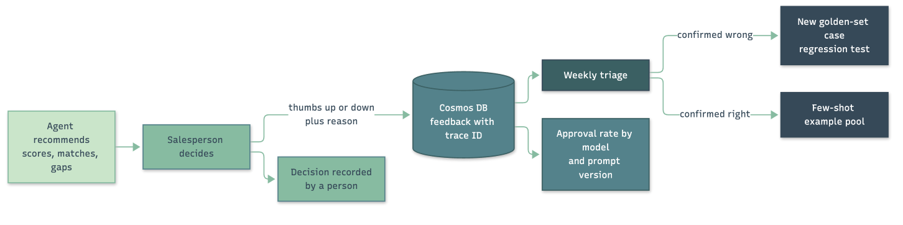
Approached this way, human oversight is what makes the system better every week, not just a compliance cost.
What we'd tell you before you start
- Watch token usage from day one. Each analysis sends up to 32,000 characters of profile text, about 8,000 tokens, so twenty analyses can reach 160,000 input tokens before HyDE and extraction are counted. The AI gateway policies in Azure API Management add per-user or per-team token limits and push token metrics into Azure Monitor, so cost shows up on a daily dashboard instead of a monthly invoice.
- Make truncation a conscious decision. We cut documents at 32,000 characters to stay inside the embedding model’s limit of roughly 8,191 tokens. The detail that matters, such as a buying signal in the latest call notes, isn’t always near the front, so splitting long profiles into sections with their own vectors is the natural next step.
- Expect default content filters to trip on ordinary business text. Handle rejections one document at a time so the request survives, then set up a custom guardrail with filter settings suited to your domain.
- Teams won’t wait long for a bot. Long pipelines need asynchronous replies through proactive messages, and the typing indicator does more for perceived speed than you’d expect.
- UX still matters even if you’re using Teams as a UI. UX is still UX, regardless of the pane of glass the user is interacting with.
- Size the search service for the full archive. Full text plus 1,536-dimension vectors takes more storage than people expect, so estimate it from the pilot batch and choose a tier with room to grow.
Plan for deletions. A delta sync driven by modified date never sees a lead deleted at source, so schedule a periodic reconciliation job to remove orphans from the index. With personal information involved, this is a data protection requirement as well as good housekeeping.
What this could do for you
Imagine if anyone in your organisation could ask a question of everything the business has ever written down, and get an answer back in the time it takes to make a coffee. Not a list of files that happen to contain the right words, but the handful of documents that matter, with a plain explanation of why each one is relevant, where they agree and where they differ. Imagine a new starter getting, in their first week, the kind of answer that used to need someone who’d been around for ten years. And imagine that knowledge staying with the business when that person moves on.
Lead profiling is one example, but the same pattern fits anywhere people search a large collection of documents by hand and then explain why each result matters. The source system, document type and scoring criteria change from one organisation to the next. The underlying approach carries over: careful extraction, hybrid retrieval, guardrails, an evaluation loop and a person making the decision.
| Use case | What the user asks | Document collection |
|---|---|---|
|
Lead prioritisation |
“Which of our open leads look most like the customers who bought this service last year?” |
CRM lead profiles |
|
Account planning |
“Which existing customers have the same challenges as this new prospect, and what did we sell them?” |
Account plans, call notes |
|
Contract comparison |
“Have we ever accepted uncapped liability from a supplier of this size, and on what terms?” |
Contract repository |
|
Bid and tender response |
“Find our strongest past answers to a question on social value in public sector IT delivery.” |
Bid library and past submissions |
|
Policy and regulatory mapping |
“Which internal policies are affected by this new regulation, and where are the gaps?” |
Policy library, regulatory texts |
|
Engineering and incident knowledge |
“Have we seen a failure like this before, and what fixed it?” |
Incident reports, design documents |
This isn’t a product we’re selling. Every organisation’s documents, questions and constraints are different, and the right solution has to be shaped around them. What we bring is what projects like this one have taught us: where text extraction quietly goes wrong, why indexing deserves the same discipline as training a model, how scores drift when the model isn’t given consistent context, how to measure whether answers are any good, and how to keep a person at the centre of the decision. In our experience the biggest gains come from getting your own documents properly indexed and measuring the results honestly. The size of the model is rarely what holds you back, and sometimes a simpler tool will do the job.
If you’ve got a pile of documents and a question your people spend too long answering, we’d be glad to talk it through. We’d start with your data and a handful of real questions, build a golden set with your experts, and look at measured results before anyone commits to anything bigger.
