
Media
Picking the right agent configuration for your next AWS project
We’ve been using Amazon Bedrock for a while and have had some great successes – sometimes using Amazon Lex as the UI, sometimes a web UI and other times wired up to Microsoft Teams. Jupyter Notebooks for internal POCs and data analysis has also been an alternate consumer for agents in the past.
Amazon Bedrock now also has Agents and AgentCore – putting aside some opinions about the product names and the general confusion that creates – both have had their place in several client solutions.
Let’s clear up any naming issues first:
Amazon Bedrock – the foundation models
Amazon Bedrock Agents – a config-driven approach to running agents
Amazon Bedrock AgentCore – the infrastructure, you write the agent code and deploy it into this service.
Which to choose when?
| Capability | Bedrock Agent | Bedrock AgentCore |
|---|---|---|
|
Coding |
Minimal, mostly config |
Primarily |
|
Looping ability |
Built-in React looping, but little control |
Complete control via an agent framework like Strands, CrewAI, LlamaIndex, LangGraph |
|
Model choice |
Anything … as long as it’s on Bedrock |
Complete control, including Amazon-hosted foundation models |
|
Tooling |
Via Lambda functions |
Python functions, MCPs, etc… |
|
RAG capability |
Bedrock Knowledge Bases |
Whatever you can wire up |
|
Observability |
CloudWatch |
Full |
So, what do we recommend as a starting point?
The metric we like is “Time to first agent”, and for that, Bedrock Agents wins. This gives you a quick POC cycle where you can evaluate what’s possible within the constraints of “Agents” and fairly often, it’ll do enough to solve your business problem.
As often happens with config-driven sandboxes, you can hit a ceiling where you need to do something custom. When that happens, AgentCore can step in to give you full control.
For the remainder of this article, we’ll dig into AgentCore in more detail.
At a high level, this is what comes out of the box with AgentCore.
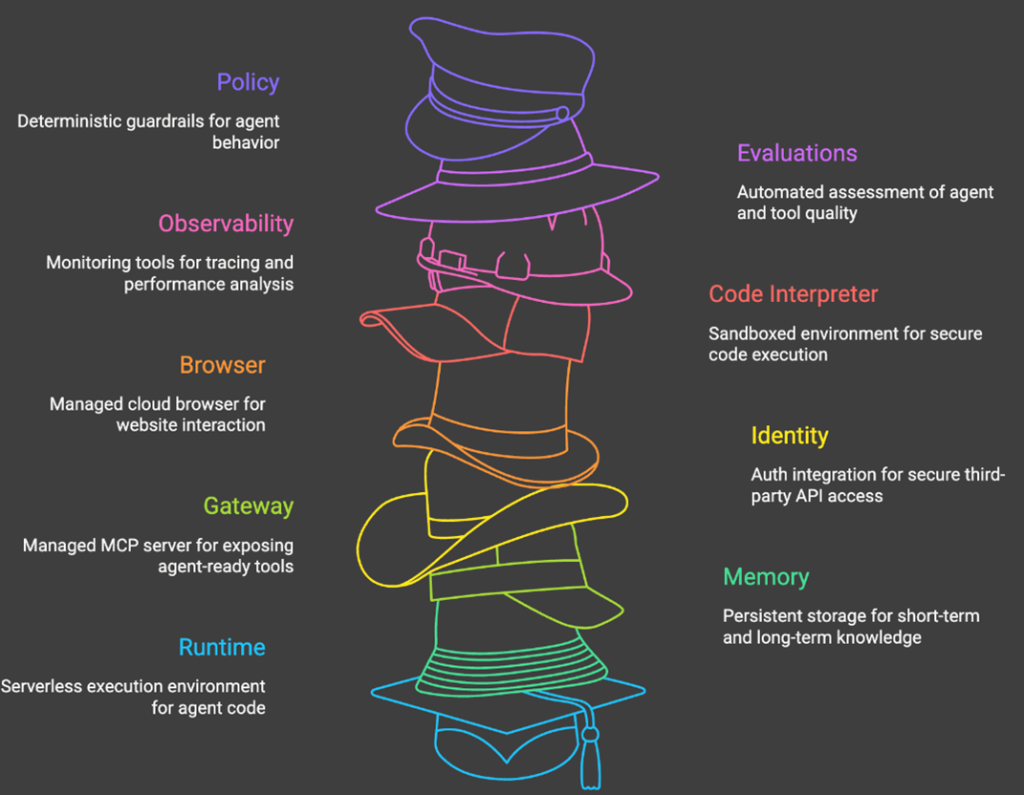
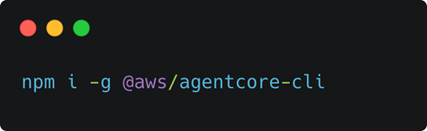
As we’ve come to expect from modern tooling, getting started with AgentCore is easy via the CLI tooling.
First, install it
And next, create the scaffolding project
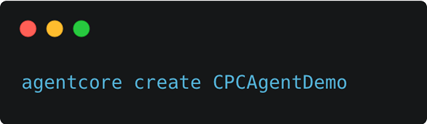
As part of the default wizard, you’ll need to make a language choice.
Both TypeScript and Python are supported, and this often leads to a larger discussion point within development teams.
TypeScript is great and we use daily, but for now, the Python ecosystem is larger when it comes to AI/ML/LLM work, so that’s our deciding factor. Thankfully, it’s purposely designed to be an easy language to pick up, and all the usual comp sci practices still apply, which is why we encourage teams to give it a go instead of viewing it as a barrier.
While Python may be our choice for these types of situations, there’s no reason you can’t still have TypeScript on the frontend and .NET/Java on the backend with your agent sandwiched in between.
Once we have the scaffolding and CLI tooling in place, we can get our first agent up and running:
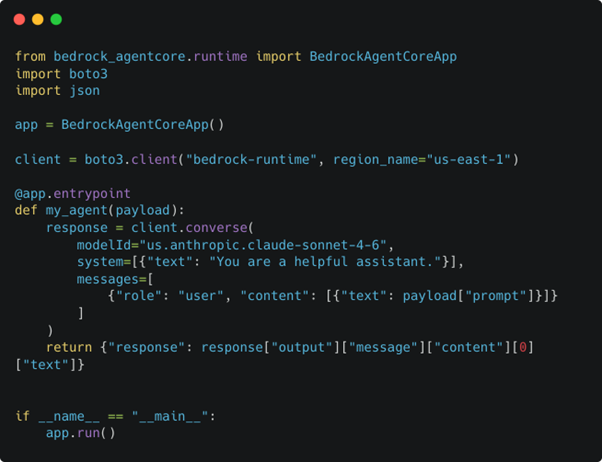
Note: Model selection is an important topic that we’ll cover later.
All we need is good old boto3 to show the basic mechanics of what an agent is.
This will work but we’ll quickly hit a wall when complexity increases. Let’s redo that previous example and use Strands Agents instead.
More or less the same, but a little neater. Even if that’s all we got from Strands, it’ll likely be enough – neater code means easier to parse as a human. Strands does deliver a lot more, which we’ll show shortly.
How can we run this locally to confirm the behaviour works?

This will start a local server process on 0.0.0.0:8080 which we can invoke like this:

And, that’s really it. Well, it’s enough to show that the agent is running locally, but our agent doesn’t know enough to be useful. How could it understand how much leave a user has?
Let’s fix that by adding our first tool and all that is, is a Python function that describes itself via a docstring and a decorator (@tool which comes from Strands). We’ve added an employee_id into the incoming prompt to show how you’d wire up parameters for your tools.
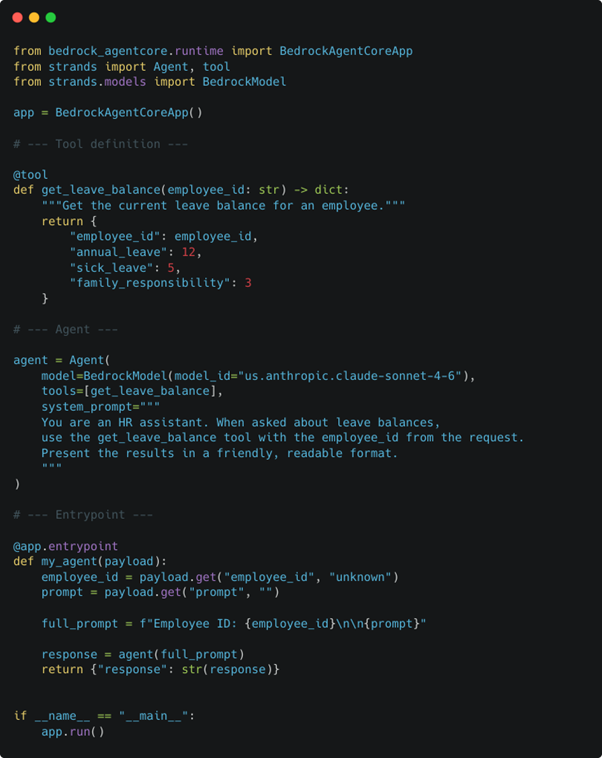
We need more structure from the incoming prompt, so we’ll use JSON and include a “prompt” and “employee_id” field.

What is happening here?
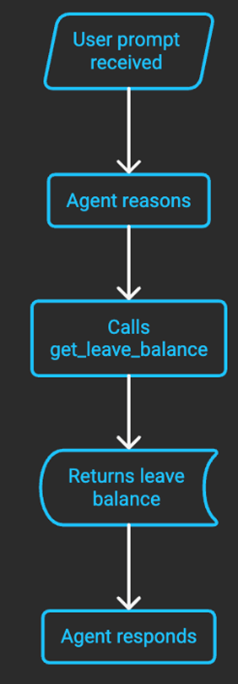
As with other agent frameworks like LangGraph, LlamaIndex and CrewAI, it’s enough to give the model a list of tools and have it figure out what to call, when and how. That’s where these frameworks start paying dividends – we can add more tools without needing to worry about how to call them.
Our get_leave_balance function will return the same info for any employee_id, but should illustrate the point.
The quality of the docstring per tool is important because models, particularly the smaller ones, can get confused and end up making non-obvious tool choices while trying to solve the prompt.
Thankfully, there is a high degree of observability built into AgentCore once your agent is deployed, with each tool call being captured as an OTEL span in CloudWatch where you get info such as:
- Which tool was called
- What inputs were passed
- What it returned
- How long it took
- Full reasoning trace around it
For local development or more advanced use cases, we can intercept the tool calls by doing this:
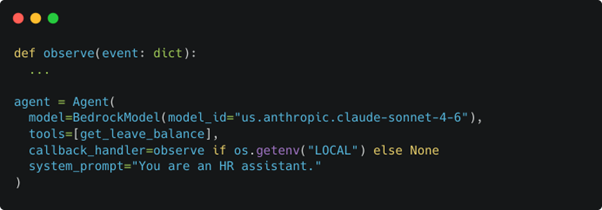
We’ll skip the definition of observe for brevity here but this function gives you details about the what and why behind the tool choice from the language model.
Writing your own tools can give your agent the skills it needs to be truly useful to your business and there’s another layer of superpowers you can give it – built in tools like the code interpreter tool.
Here’s a glimpse of what we’re working on inhouse that makes use of this tool.
Imagine if our agent could make sense of a prompt like this:

We could create a tool to satisfy this, but we’d end up with countless tools for all possible queries, and that defeats the purpose of what we’re trying to build – a genuinely useful agent for business.
Using the built-in code interpreter from AgentCore, here’s how we could equip our agent with the abilities it needs to solve that user query.
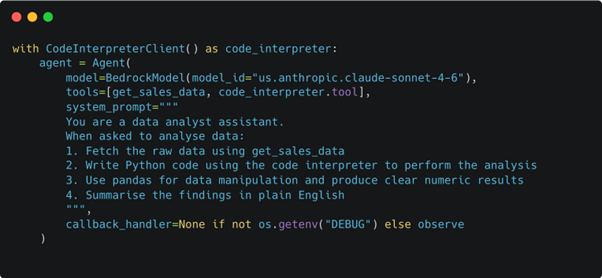
We’ll skip over the get_sales_data tool details for now, but it could be a connection to your financial system’s MCP or pulling an Excel file from SharePoint and returning some tabular data.
This starts to give our agent the ability to answer business intelligence questions which we wouldn’t be able to predict at agent design time. It’s also part of our demo for an upcoming talk at DataFest 2026.
As we close up this introduction to why we enjoy using AgentCore, let’s discuss model selection and model flipping.
Model selection
When we specify a model_id we have three patterns to follow:
A geo-cross region identifier like us.anthropic.claude-sonnet-4-5-20251101, which let’s AWS decide where to find that model within a certain region, US in this case. This approach works well as we get built in fail over should there be an outage or reduced capacity in one specific region.
The downside with this approach is only certain regions are supported, which means you could like have a data residency issue if you’ve gone this route and you have a compliance requirement to stick to, example, South Africa.
A second option, with even wider reach, is global cross region. The pattern for that looks like global.amazon.nova-2-lite-v1:0.
The most restrictive is using a direct ARN like arn:aws:bedrock:af-south-1::foundation-model/anthropic.claude-sonnet-4-5-v1:0 which pins the model to a specific region. Great, if the model is available in that region and if there is capacity at inherence time.
Balance the data residency decisions, fail over needs and which models can be useful for your architecture and you have some decisions to make which require careful consideration.
Even though your data stays in country, the compute may not. Rather be aware of this early on so you can make solid decisions.
A final extra element to consider – it’s not just availability, but potential throttling that must be factored in.
Model flipping
With many of the agents we have deployed, we end up using several models with different capabilities to meet an objective.
Some models are powerful but expensive. Some models are lightweight, cheap and fast, but require extra validation. Others are OK at several tasks but not exceptional.
For us, a ReAct loop where smaller models do validation on the work of bigger models has laid a good foundation on projects.
Small models can excel as guard rails too.
Some agents work in a near-real time environment, others as part of batch, or offline-style, architectures. For the latter scenarios, slower models can work well.
Keep model location in mind when adopting this style of model combinations.
Get in touch if you’d like guidance on your next AWS agent architecture and good luck!
Services

Do you have any questions or queries?